

Requirements
Take into account the following requirements, limitations, and preparations for this service.How it works
With multi pay-in, you receive the payouts for payments acquired by your pay-in partner (third-party provider) in a multi pay-in account. You then transfer the funds from the multi pay-in account to balance accounts in your balance platform, splitting the payments between your user’s and your own liable balance accounts. To comply with financial regulations, you must allocate the funds you receive in your multi pay-in account to the balance accounts in your balance platform within 24 hours. The following sections describe how you can receive, allocate, and refund payments acquired or processed through a pay-in partner.1. Receive funds
When you request multi pay-in, we create a multi pay-in account for you in your balance platform to act as the payout account for your pay-in partner. If you have many pay-in partners, we create a separate account for each of them. The multi pay-in account is legally held by Adyen solely for your user’s benefit to hold their funds before you allocate them to the balance accounts in your platform. For more information on multi pay-in accounts, see Receive funds from a third party.2. Allocate payments
After you receive the funds in your multi pay-in account, you allocate each payment to the balance accounts in your platform by making a POST /payments API request. In your payment request, you specify the split instructions, as you would for any payment acquired through Adyen. According to the split instructions you send in the request, we allocate the funds to specified balance accounts in your balance platform. If you do not send the split instructions in the request, all funds and fees are booked to your liable balance account. The following diagram shows the flow of funds when you use multi pay-in to consolidate payments acquired by Adyen and your pay-in partner in your balance platform: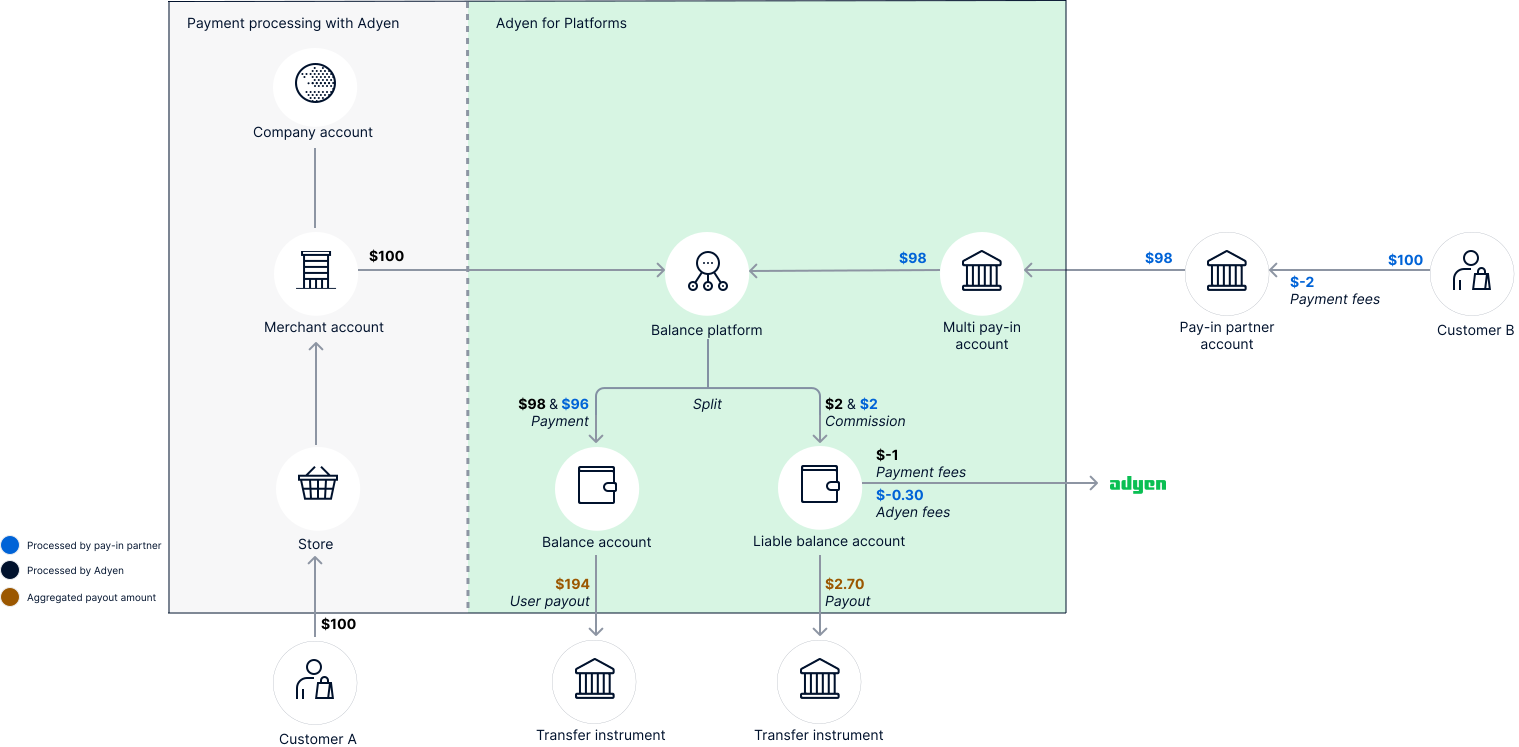
-
The customers pay.
- Customer A pays EUR 100.00, which is processed by Adyen (left).
- Customer B pays EUR 100.00, which is processed through your pay-in partner (right).
- The processing fees for the third-party payment are deducted by the pay-in partner.
- The payments for the goods or services are credited to your user’s balance account.
- Your commission for both payments is credited to your liable balance account.
- All applicable fees are deducted from your liable balance account.
- All funds are settled in and paid out from the balance accounts in your balance platform.
3. Refund payments
When needed, you can initiate partial or full refunds for third-party payments using multi pay-in. The refund process can differ depending on your pay-in partner. In general, if a customer asks for a refund:- Your pay-in partner transfers the refund amount to your user’s customer.
- The pay-in partner withholds the refund amount from the next payout batch to your multi pay-in account.
- You send a /payments/{paymentPspReference}/refunds request to debit the refund amount.
- The funds are deducted from specified balance accounts in your balance platform, according to your instructions.
- The refund amount is transferred to your multi pay-in account to offset the amount withheld by your pay-in partner.
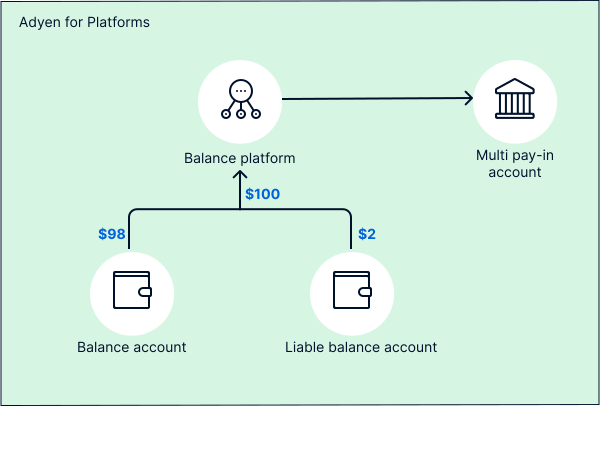
- You send a refund request to Adyen.
-
We deduct the funds.
- We deduct EUR 98.00 from your user’s balance account (payment).
- We deduct EUR 2.00 from your liable balance account (commission).
- We transfer the full refund amount (USD 100.00) to your multi pay-in account.
Next steps
Receive funds
Required. Learn about how funds settle in your multi pay-in accounts.
Top up multi pay-in account
Top up the balance of your multi pay-in account with funds from your liable balance account.
Allocate third-party payments
Required. Learn how to transfer and allocate funds using multi pay-in.
Refund third-party payments
Learn how to refund payments processed through a pay-in partner.