

Requirements
Before you begin, make sure that you fulfill the following requirements:Overview
The process to create and activate card-on-file network tokens is as follows:- Your cardholder provides the card details to the merchant.
- The merchant sends a network token request to the card scheme.
- The card scheme sends the network token request to Adyen.
- Adyen analyzes and approves the request if all the information in the request is correct.
- Adyen sends the network token and the corresponding card details to the card scheme.
- The card scheme stores the network token and the corresponding card details.
- The card scheme sends the network token to the merchant.
- The merchant stores the network token.
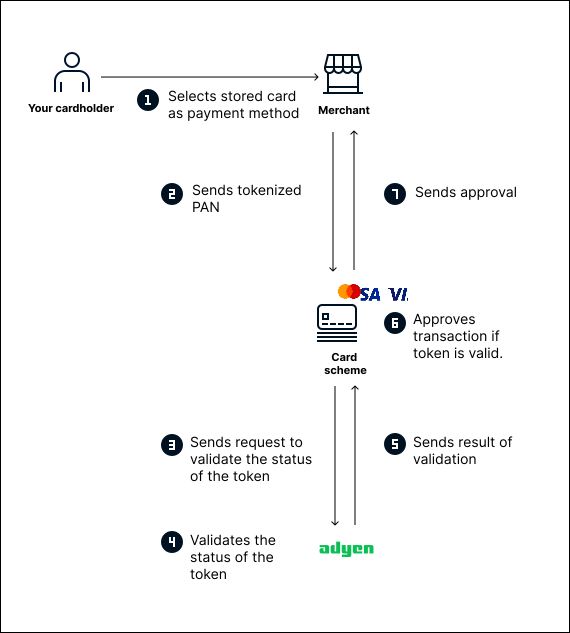
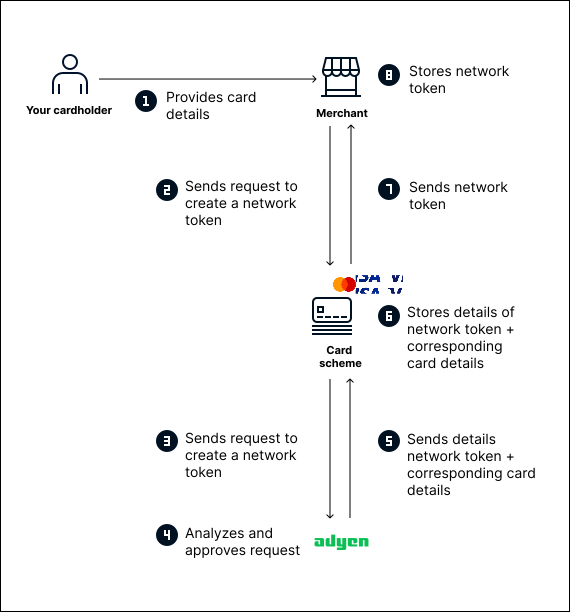 When your cardholder tries to make a purchase using the stored card details, the process is as follows:
- Your cardholder selects the stored card as a payment method.
- The merchant sends the network token to the card scheme.
- The card scheme sends a request to Adyen to validate the status of the network token.
- Adyen validates the status of the network token.
- Adyen sends the result of the validation to the card scheme.
- If the network token is valid, the card scheme approves the transaction.
- The card scheme sends the approval to the merchant.
Provisioning for card-on-file network tokens
Provisioning is the process of creating a network token. Provisioning is initiated when a merchant tries to save your cardholder’s data for card-on-file payments. The initial part of the provisioning flow is as follows:- Your user provides the card details to the merchant.
- The merchant sends a request to the card scheme to create a network token for the card.
- The card scheme forwards the network token request to Adyen.
Verification process for provisioning
Card schemes maintain allowlists of approved merchants that are authorized to use card-on-file network tokens. When Adyen receives a network token request, Adyen verifies that the merchant is on the allowlist of the corresponding card scheme. The verification results in one of the following outcomes:- If the merchant is on the allowlist, Adyen automatically approves the network token.
- If the merchant is not on the allowlist, Adyen automatically closes the network token and ends the provisioning process.
- Token approved automatically
- Token closed automatically
When Adyen approves the network token automatically, the provisioning flow is as follows:
- The provisioning process is initiated.
- Adyen creates the network token with an inactive status.
- Adyen sends a webhook to inform your server that a network token was created.
- Adyen verifies that the merchant is on the allowlist of the card scheme.
- If the merchant is on the allowlist, Adyen activates the network token.
- Adyen sends a webhook to inform you about the outcome.
- Adyen sends the network token and the card details to the card scheme.
- The card scheme stores the network token and the card details.
- The card scheme sends the network token to the merchant.
- The merchant stores the network token.
