

Requirements
Before you begin, make sure that you fulfill the following requirements:Overview
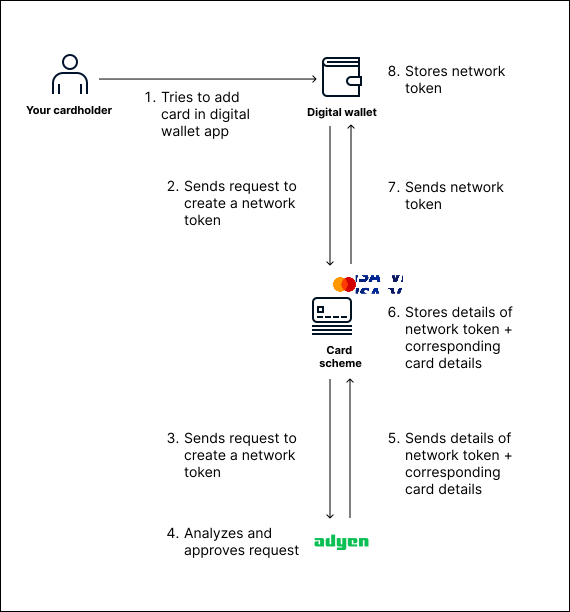
To use a digital wallet, your cardholder must add the card to the digital wallet. When your cardholder attempts this, it triggers the following process:- Your cardholder tries to add their card to their digital wallet.
- The digital wallet sends a network token request to the card scheme.
- The card scheme sends the network token request to Adyen.
- Adyen analyzes and approves the request if all the information in the request is correct.
- Adyen sends the network token and the corresponding card details to the card scheme.
- The card scheme stores the network token and the corresponding card details.
- The card scheme sends the network token to the digital wallet.
- The digital wallet stores the network token.
 After the previous process is complete, your cardholder can use the digital wallet to make online or in-person payments.
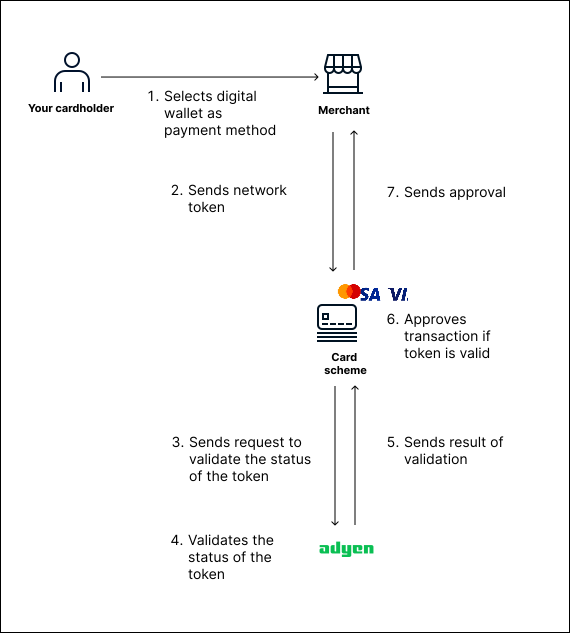
When your cardholder makes a payment, your cardholder’s payment data is processed as follows:
- Your cardholder selects the digital wallet as a payment method.
- The merchant sends the network token from the digital wallet to the card scheme.
- The card scheme sends a request to Adyen to validate the status of the network token.
- Adyen validates the status of the network token.
- Adyen sends the result of the validation to the card scheme.
- If the network token is valid, the card scheme approves the transaction.
- The card scheme sends the approval to the merchant.
Provisioning for a digital wallet
Provisioning is the process of creating a network token. Provisioning is initiated when your cardholder tries to add their card to a digital wallet. The initial part of the provisioning flow is as follows:- Your cardholder adds the card to a digital wallet.
- The digital wallet sends a request to the card scheme to create a network token for the card.
- The card scheme forwards the network token request to Adyen.
Decision process for provisioning
The decision process has one of the following outcomes:- Adyen activates the network token automatically, without further verifications.
- Adyen requires two-factor authentication to verify your cardholder’s identity.
- Adyen requires that your cardholder contacts you by phone call to verify their identity.
- Adyen closes the network token automatically and ends the process.
- Token activated automatically
- Two-factor authentication required
- Phone call authentication required
- Token closed automatically
Adyen activates the token automatically when the risk analysis determines that there is low risk associated with creating the network token. In this case, Adyen activates the network token without further verifications or additional API requests from your server.When Adyen activates the network token automatically, the provisioning flow is as follows:
- The provisioning process is initiated.
- Adyen creates the network token with an inactive status.
- Adyen sends a webhook to inform your server that a network token was created.
- Adyen performs a risk analysis using the information in the network token request.
- If the risk is low, Adyen changes the status of the network token to active.
- Adyen sends a webhook to inform you about the decision.
- Adyen sends the network token and the card details to the card scheme.
- The card scheme stores the network token and the card details.
- The card scheme sends the network token to the digital wallet.
- The digital wallet stores the network token.


