

- Select Finance > Sales to payouts from the left navigation.
If you are in a company account, you get a prompt to select a merchant account. - Select a merchant account under Suggested merchant accounts.
- Select a date range from the drop-down menu at the top right of the page.
.csv format instead, select the Export button.
Sales
Select the Sales tab from the top to see the sales in the specified date range. The summary at the top of the page shows the following sales amounts:- Sales: The total amount of transactions with status of
SentForSettleorSettled. - Refunds: The total amount of transactions with status of
SentForRefundorRefunded. - Sales - Refunds: The Sales amount minus the Refunds amount.
- Pending (incl. pending refunds): The total amount of transactions with status of
SentForSettleorSentForRefund.

Sales history
The Sales history chart shows the total sales amount for each increment of time in the selected date range. Each bar on the chart, depending on its color, indicates the amount that is Pending, Ready for payout, or Paid out. The key in the bottom right corner of the chart shows the colors and their corresponding statuses.Refunds history
The Refunds history chart shows the total refunds amount for each increment of time in the selected date range. Each bar on the chart, depending on its color, indicates the amount that is Pending, Refunded, ready for payout, or Refunded, paid out. The key in the bottom right corner of the chart shows the colors and their corresponding statuses.Details
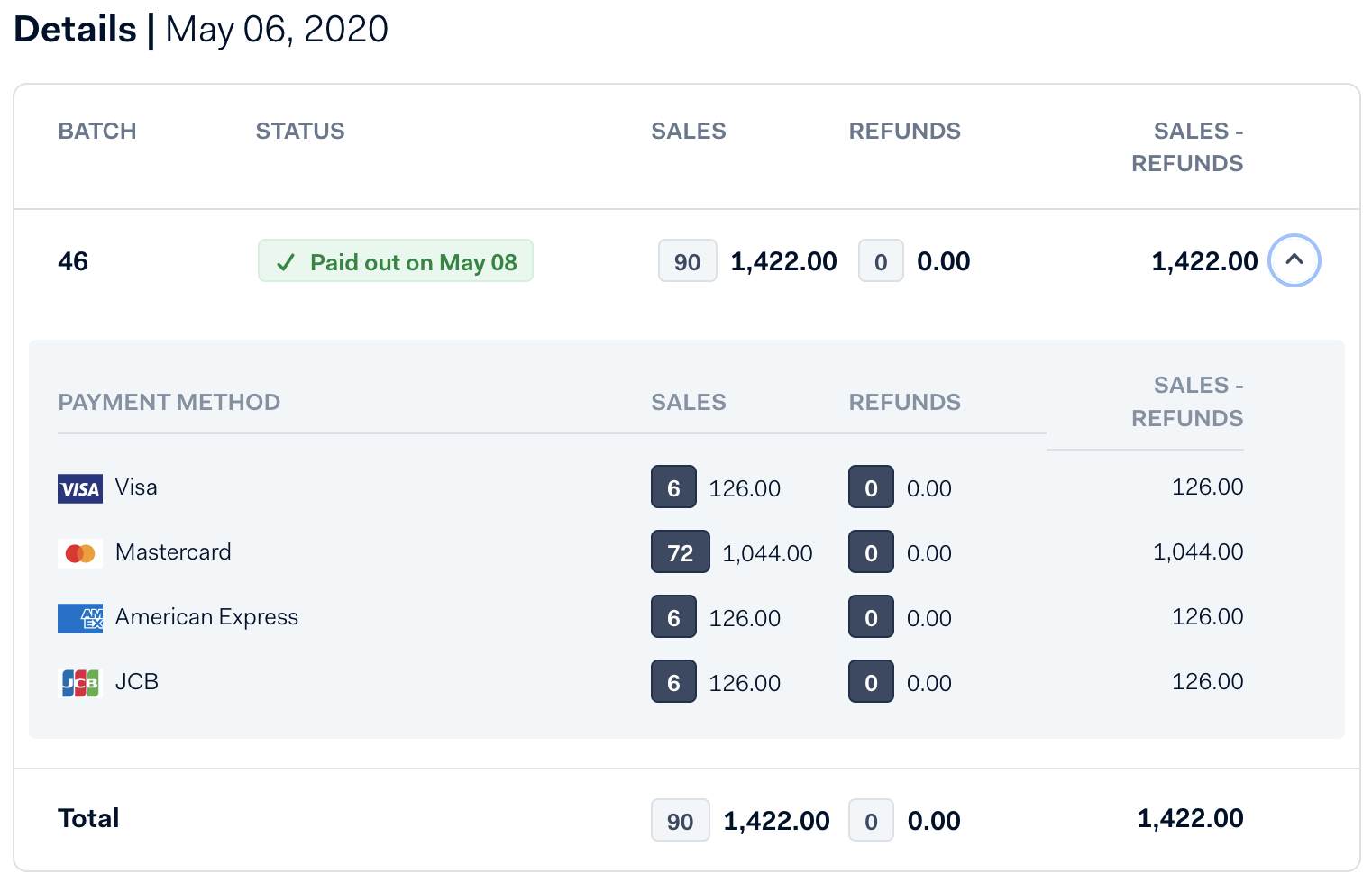
When you select the bar of a specific day, week, or month, you see the details. In the example screenshot, the May 06 bar from the chart is selected. The Details section shows the following amounts for that day’s batch:- BATCH: The batch number that includes the day’s sales.
- STATUS: Whether the batch had been paid out.
- SALES: The total sales amount.
- SALES - REFUNDS: The sales amount minus the refunds amount.
Payouts
 Select the Payouts tab from the top to see the payouts in the selected date range.
The summary at the top of the page shows the following numbers:
- Sales: The total amount of transactions with status of
Settled. - Refunds: The total amount of transactions with status of
Refunded. - Cost of transactions: The total costs for payment processing.
- Adjustments: The total cost of adjustments. For example chargebacks, deposit corrections, invoice deductions, and balance transfers.
- Payout: The amount that has been paid out to your bank account.
Payout history
The Payout history chart shows the total payouts amount for each increment of time in the selected date range. Each bar on the chart indicates the amount that had been paid out.Details
When you select the bar of a specific day, week, or month, you see the details. In the example screenshot, the bar for May 08, 2020 is selected. The Details section shows the following amounts for the batch paid out on that day:- BATCH: The batch number of the payout.
- STATUS: Whether the batch has been paid out.
- SALES: The total sales amount.
- REFUNDS: The total refunds amount.
- COST: The total transaction costs amount.
- ADJUSTMENTS: The total adjustments, such as chargebacks, deposit corrections, invoice deductions, and balance transfers.
- PAYOUT: The payout amount.
.csv format, select the download icon **in the row of the batch.
