

Requirements
How it works
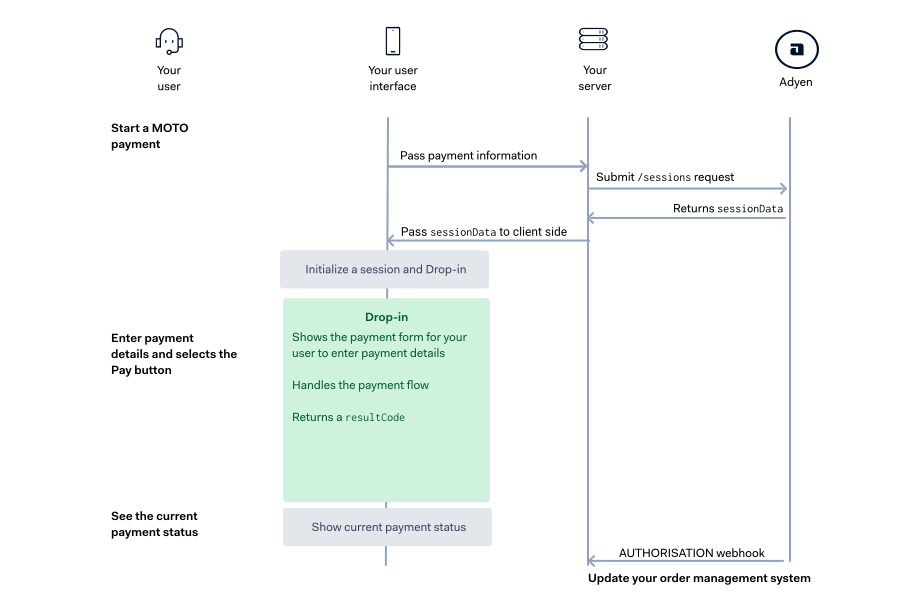
Use the Checkout API to initiate a payment session and enter the shopper’s payment details in the Drop-in payment form.- Your shopper contacts you to initiate a MOTO payment.
- Your user (for example, an agent in your call center) goes to your UI for MOTO payments.
- Your user enters the payment amount and other required information in your UI.
- Your UI application passes the payment amount and other required information to your server.
- Your server makes an API request to create a payment session.
- Your UI application creates an instance of Drop-in using the session data from the server.
- Drop-in shows the payment form.
- Your user enters the shopper’s payment details in the payment form and submits the payment.
- Your webhook server receives the webhook containing the payment outcome.
Create a session
Create the payment session resource that includes payment amount information. To create a payment session, make a /sessions request, including:| Parameter name | Required | Description |
|---|---|---|
| amount |  | The currency and value of the payment, in minor units. This is used to filter the list of available payment methods to your shopper. |
| shopperInteraction | | Set to Moto. This indicates that this is a MOTO payment. |
allowedPaymentMethods | | Set to scheme. This indicates that this is a card payment. |
merchantAccount | | Your merchant account name. |
reference | | Your unique reference for the payment. Minimum length: three characters. |
returnUrl | | URL where your user should be taken back to, in case of a redirection. Format: - Maximum of 1024 characters - Must include the protocol: http:// or https://. You can also include your own additional query parameters like the order reference number. |
sessionData: the payment session data you need to pass to your front end.id: a unique identifier for the session data.- The request body.
errorCode field and the list of API error codes to troubleshoot.
Prepare your front end
Use Drop-in to show the payment form in your UI, where you enter the shopper’s payment details.Install Adyen Web
Use the Adyen Web npm package, or embed the Adyen Web script and stylesheet into your HTML file:- npm (recommended)
- Embed script and stylesheet
Install the Adyen Web Node package:Import Adyen Web with the resources for card payments into your application.