

- Making funds transfers to third-party bank accounts.
- Consulting the transaction history of a business account.
- Creating transfer limits.
Requirements
Before you begin, make sure that you fulfill the following requirements:How it works
After your user starts a procedure that requires SCA, your application initiates the SCA flow. Your user must successfully complete the SCA flow to the API requests required for the procedure. The following diagram shows the flow for performing SCA challenges to validate API requests.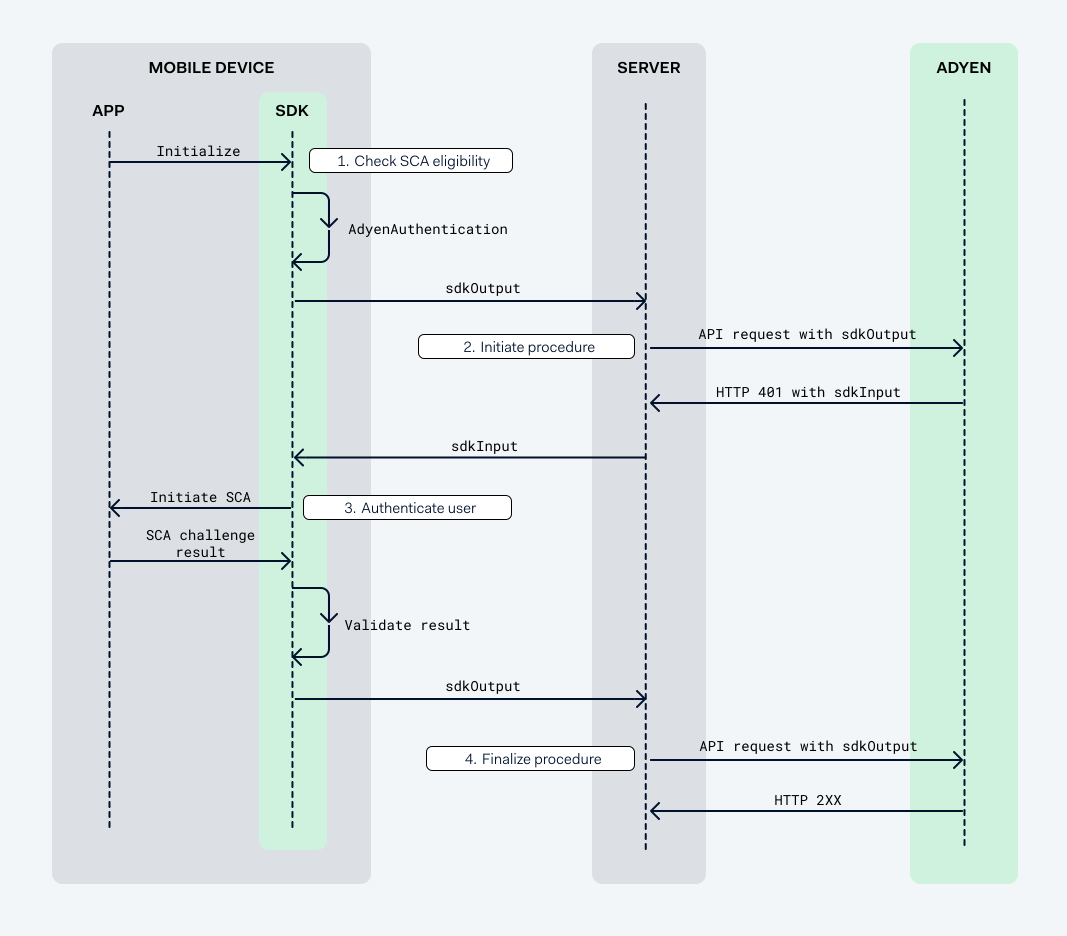 As shown in the preceding diagram, the flow for performing SCA on your user is as follows:
-
The Authentication SDK checks if the device is eligible for SCA.
- Your application initializes the Authentication SDK.
- The Authentication SDK calls a method that checks if the device is eligible for SCA.
- If the check is successful, the Authentication SDK passes the
sdkOutputto your server.
-
Your server makes an API request to initiate the procedure.
- Your server makes an API request to Adyen including the
sdkOutputfrom the previous step in the header. - If the request is successful, Adyen returns an HTTP 401 response that includes an
sdkInput. - Your server passes the
sdkInputto the Authentication SDK.
- Your server makes an API request to Adyen including the
-
The Authentication SDK initiates the SCA verification process for your user.
- The Authentication SDK calls a method to prompt an SCA challenge in your application.
- Your user completes the challenge.
- The Authentication SDK validates the solution of the challenge.
- If the challenge is completed successfully, the Authentication SDK passes a new
sdkOutputto your server.
-
Your server makes an API request to finalize the procedure.
- Your server makes an API request to Adyen including the
sdkOutputfrom the previous step in the header. - If the request is successful, Adyen returns an HTTP 2xx response. The exact HTTP status code depends on the endpoint.
- Your server makes an API request to Adyen including the
Check SCA eligibility
Before initiating a procedure that requires SCA, you must check that the device is eligible for SCA. The following tabs explain how to check for SCA eligibility using the Authentication SDK for Kotlin, Swift, or JavaScript. This functionality requires additional configuration from Adyen. To enable it, contact our Support Team.- Android (Kotlin)
- iOS (Swift)
- Web (JavaScript)
- Android (Kotlin)
- iOS (Swift)
- Web (JavaScript)
To check if the Android device is eligible for SCA:
-
Initiate the
AdyenAuthenticationclass in your Activity or Fragment. Initiate authentication -
Check if SCA is available on the device.
Check SCA eligibility
The function returns an
sdkOutput. -
Pass the
sdkOutputto your server.
