

Requirements
Before you begin, take into account the following requirements and preparations.How it works
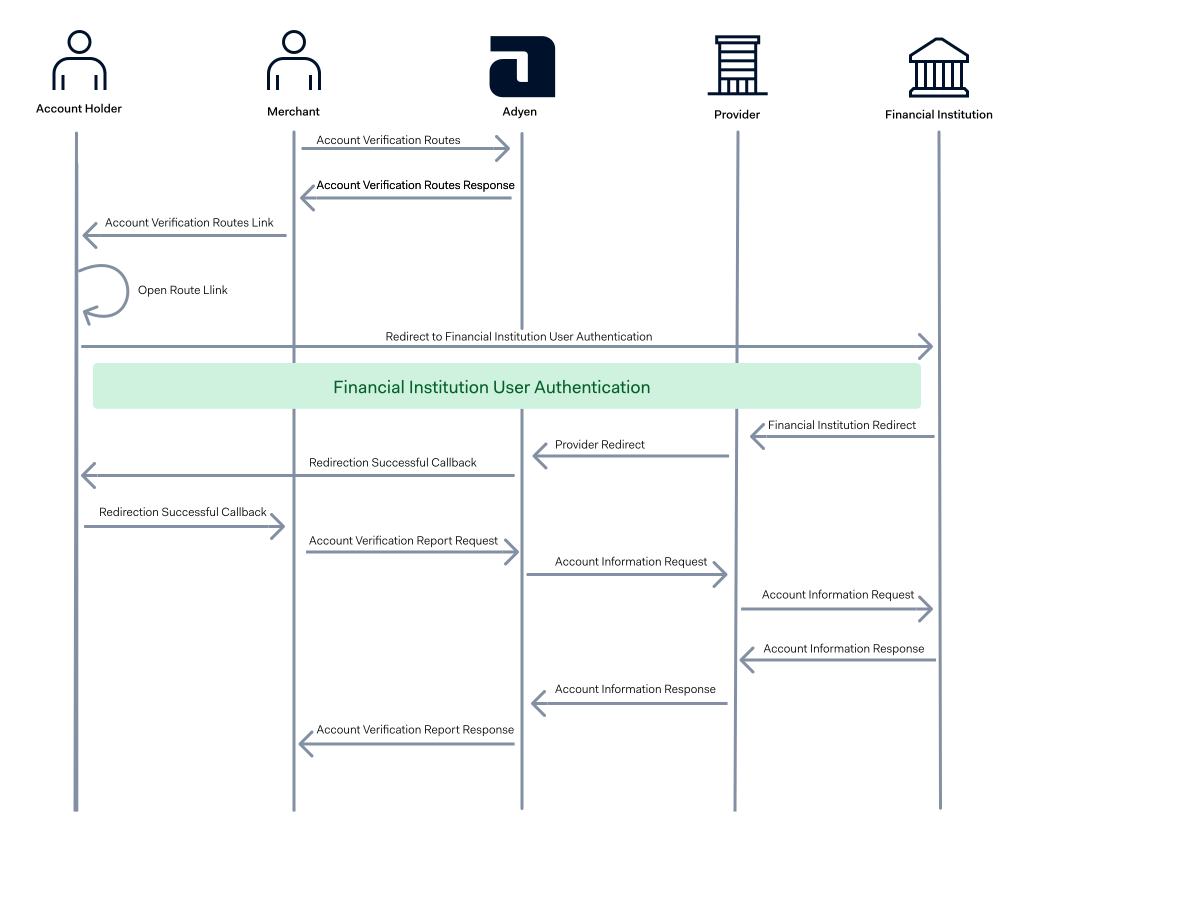
When you want to verify a third-party individual’s bank account ownership through a redirect, use the following flow.-
Make a request to the /routes generation endpoint to get a list of available account verification routes. Each route represents a possible connection path between the third-party individual and their bank. When the third-party individual successfully connects through one of these routes, you will receive a report code. Use the code to:
- Request a bank account verification report.
- Verify the third-party individual’s identity using the information in the bank account verification report.
- Redirect the third-party individual to the AISP’s bank selection and authentication/authorization flow. After the third-party individual completes the authentication flow and authorizes their bank to generate and share a report, the merchant receives a report code (or error details). This report code or error details will be provided in the redirectUrl the merchant specified in the routes generation request.
- Use the report code to make a request to the /reports/{code} endpoint. This request retrieves a bank account verification report containing information about the third-party individual and account number (ACH, BSB, EFT, IBAN) the third-party individual has agreed to share with the merchant.
Generate a list of routes
To get a list of available account verification routes.-
Make a POST /routes request with the following parameters in the request body. The request header includes, your
ADYEN-API-KEYandapplication/jsonspecifying the format of the request body:Request: Get a list of AISP routesParameter Required Description country 
The location where the third-party individual’s bank account is registered. Adyen uses this information to determine the best provider for the given location, and to configure the open banking flow for that respective location. locale The language to configure for the verification flow user interface. This information is used to configure the open banking flow with the same language for a consistent user experience. state This is an optional value to identify the request in callback handling. You can generate this value on a per-session basis to protect the callback against Cross-Site Request Forgery (CSRF) attacks. This value must be composed of characters that can be successfully URL-encoded. Note, this value will be stored in external systems, so make sure that you avoid exposing any sensitive information in a plain-text format. redirectUrl The URL where Adyen should redirect the third-party individual when the open banking flow finishes. Adyen’s open banking gateway returns a report code as a parameter in the URL response. You can use this code when making a request to the /reports/{code} endpoint to get the bank account verification report for the third-party individual. -
The response contains the details about the provider that the third-party individual will be redirected to during the flow, and the link to begin the open banking flow.
Response: List of available routes sorted by priority.
Redirect and handle the result
The Adyen open banking gateway handles the outgoing and incoming communications with the AISP. When the third-party individual opens the route link, the gateway redirects them to the external financial institution for account verification. After the verification flow at the external financial institution is complete, the gateway redirects the third-party individual from the financial institution back to the redirectUrl provided in the generate list of routes step. For successful callbacks, the gateway adds a report code to the query parameters. Use this code to download a bank account verification report from the /reports/{code} endpoint in the view the bank account verification report step. In cases where there are errors, the third-party individual is redirected to the redirectUrl with the error information in the query parameters.-
View the response of the redirectUrl and check if there was a successful redirection callback. A successful redirection callback may look like this:
Successful redirection callback
-
The response contains the details about the
typeindicating success or error, the state , asignature, and a code. Use this codeto download a bank account verification report from the /reports/{code} endpoint in the view the bank account verification report step.If you encounter a redirection error callback, it may look like this: Unsuccessful redirection callbackThe response contains the details about thetypeindicating success or error, theerror_codeanderror_messageassociated with the failed redirection request callback, state, and asignature.
Error codes and messages
Here’s a list of error codes and corresponding error messages you can receive from Adyen’s open banking gateway. Depending on the context of the error code and message, you choose how to handle the error and present options to your third-party individual.View the bank account verification report
To download the bank account verification report for a third-party individual.-
Make a GET /reports/{code} request, where code is a unique identifier for a specific bank account verification report. This is the code you received as a result of a successful callback to the open banking flow:
Request: Retrieve the bank account verification report for a third-party individual
Parameter Required Description code The code you receive after a successful open banking flow that is included as a query parameter in the redirectUrl callback. -
Confirm that the
x-stateheader matches the state provided in the generate a list of routes request. Response header -
The response returns the report resource, identified by its unique id. You also receive the
countrywhere the report was generated, and theaccountsthat were verified through the open banking authorization flow.
- Response with IBAN account
- Response with ACH accounts
- Response with ETF account
- Response with BSB account