

- Hosted onboarding: Direct your users to a page hosted by Adyen, where Adyen manages the onboarding flow and user interface (UI). You need to implement a few API calls to create the resources.
- API-only onboarding: Build your own UI and collect required user data. You make API requests to create resources and submit the user data to Adyen. This onboarding type gives you complete control over the user journey within your platform’s environment.
Requirements
If you have an Adyen Issuing integration, there are no additional requirements, limitations, or preparations.Hosted onboarding
Hosted onboarding Postman flows
 Try out Postman flows in your private workspace to test all the required API calls with your own credentials. Select your business model: marketplace or platform.
Hosted onboarding is our recommended solution for collecting the information needed to onboard your users. This option requires less integration effort, because your users provide their information directly on a page hosted by Adyen.
You need to make a few API calls to the Legal Entity Management API and Configuration API to create and customize the resources required to generate the Adyen-hosted onboarding page.
You can also customize the theme, the language, and the user permissions of the hosted onboarding page.
If your users need to accept Adyen’s Terms of Service, we include this step on the hosted onboarding page.
Supported countries and regions
You can use hosted onboarding in the following locations where your users are operating. AustraliaAustria
Belgium
Bulgaria
Canada
Croatia
Cyprus
Czech Republic
Denmark
Estonia
Finland
France
Germany
Gibraltar
Greece
Guernsey
Hong Kong
Hungary
Ireland
Italy
Latvia
Liechtenstein
Lithuania
Luxembourg
Malta
Netherlands
New Zealand
Norway
Poland
Portugal
Romania
Singapore
Slovakia
Slovenia
Spain
Sweden
Switzerland
United Kingdom (including Isle of Man & Jersey)
United States (including Puerto Rico)
Instant bank account verification in hosted onboarding
For some locations and legal entity types, your users can choose to instantly verify their bank account details in your hosted onboarding page. They are prompted to log in to their online banking environment and confirm their account details. Their bank account is then verified within seconds without them needing to provide a bank statement. **See supported countries/regions
This feature is currently only available for the following locations and legal entity types.| Country/region | Individuals | Organizations |
|---|---|---|
| Austria |  | |
| Belgium | | |
| Canada | | |
| Denmark | | |
| Estonia | | |
| Finland | | |
| France | | |
| Germany | | |
| Ireland | | |
| Italy | | |
| Latvia | | |
| Lithuania | | |
| Netherlands | | |
| Norway | | |
| Portugal | | |
| Poland | | |
| Spain | | |
| Sweden | | |
| United Kingdom | | |
| United States | | |
Autofill individual details using ID documents in hosted onboarding
This feature is only available if you are using onboarding v3 or v4 Users filling in their personal details can now scan or upload their ID document in the hosted onboarding page to add this information. This ensures that the information matches the document and improves verification pass rates. Only ID documents that contain Latin characters are supported. After scanning or uploading their ID document, the user can confirm their information before submitting it to Adyen.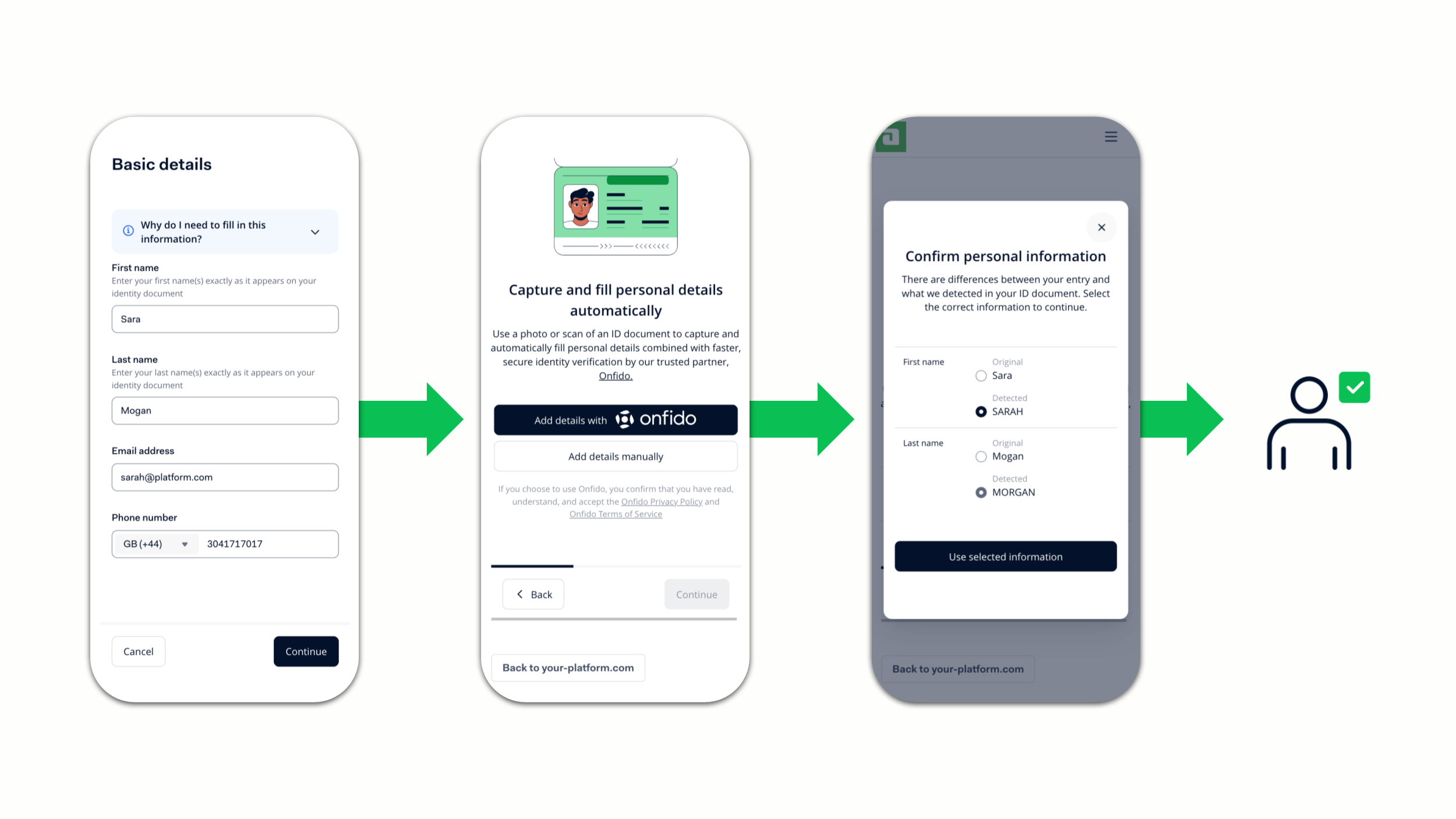 To test this feature, use the following sample document.
Guided flow to add decision-makers for organizations in hosted onboarding
This feature is only available if you are using onboarding v3 or v4 Users can answer a series of questions to ensure that they select the correct role for the decision-makers for their organization. Decision-makers include ultimate beneficial owners, controlling persons, and signatories.
Verify decision-makers by invite in hosted onboarding
This feature is only available in the test environment. This feature is only available if you are using onboarding v3 or v4. After a user adds a decision-maker and enters their basic details, the user can select Invite decision-maker to ask the decision-maker to complete their own verification.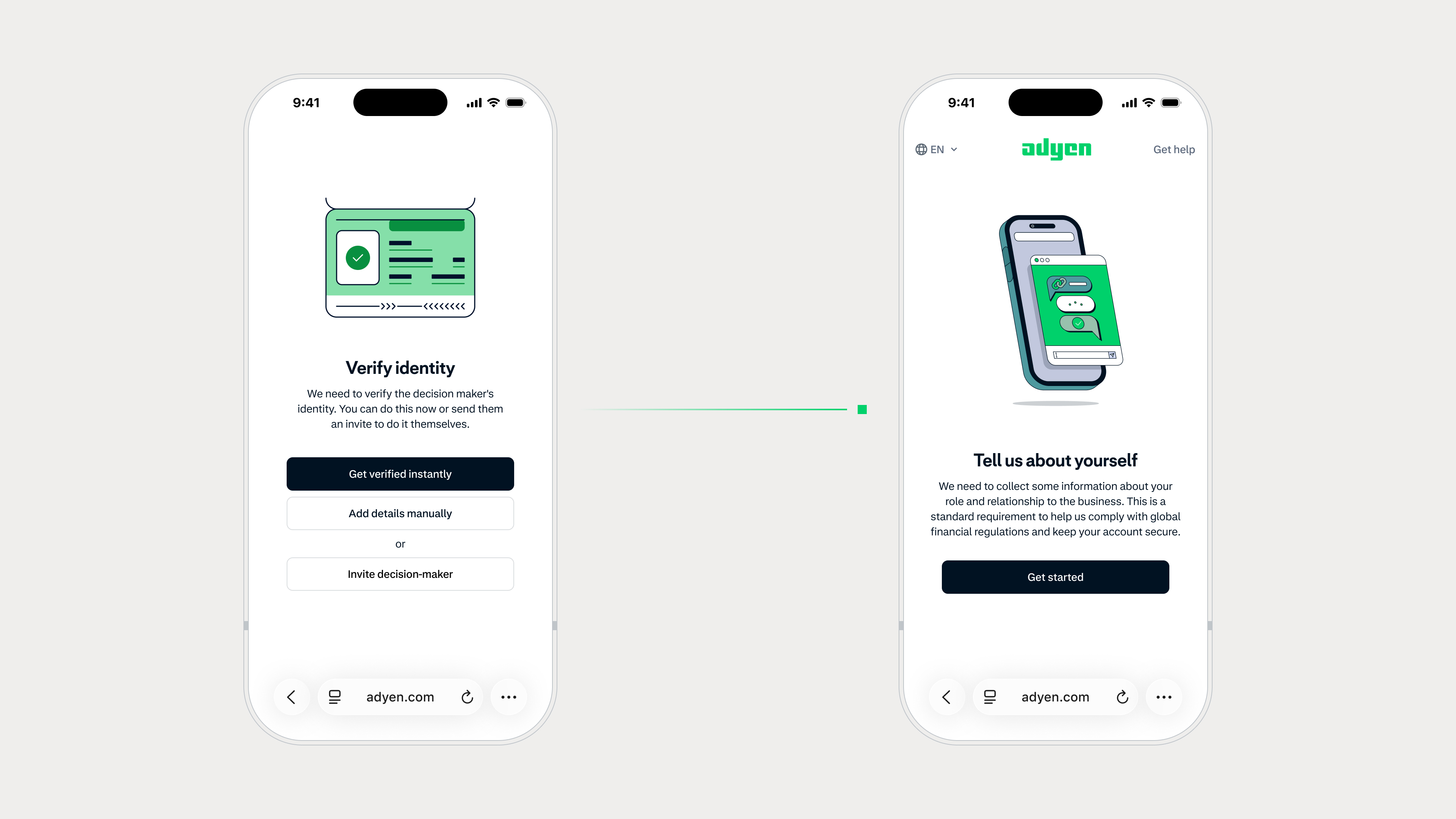 The user can then fill in the invite details, add an optional message, and select Continue to send the invite.
Adyen sends an email to the decision-maker with a link to provide their information. You can customize the appearance of these emails in your Customer Area.
API-only onboarding
With API-only onboarding, you need to build your own UI where you collect data from your users. You then need to submit the collected data to Adyen by making requests to the Legal Entity Management API and the Configuration API. To build your integration more quickly, you also can embed Onboarding components into your UI to let your users enter their data. These components use the entered data to create the relevant resource. This means you do not need to make an API request to create the resource yourself.Onboarding v4 requirements
The following requirements apply if you want to issue cards to your users.Business lines
You must create business lines to issue cards to your users. To submit this information to Adyen, make a POST /businessLines request, specifying theservice as issuing. In your request, specify the industry code.
Source of funds
Only applicable for business accounts and card issuing. Adyen is required to verify the source of funds (SOF) used to fund an account. This requirement is applicable for both card issuing and business accounts. Depending on the type of funds, we may request additional documents as proof. We strongly recommend that you have these documents available before starting in order to speed up this process. To submit this information to Adyen, make a POST /businessLines request, specifying theservice as either:
- banking for business accounts
- issuing for card issuing
sourceOfFunds.adyenProcessedFunds to true. If the source of funds was not processed through Adyen, set the sourceOfFunds.adyenProcessedFunds to false. You must then include the sourceOfFunds.type and sourceOfFunds.description. The description must state the origin of the source of funds.
The following table shows the accepted funding sources and the required documents for each type, if requested. If the type of accepted document has a listed date requirement, the document must meet this requirement.
Next steps
Onboarding steps
Required. See the required verification information for your users and how to submit it to Adyen
Customize hosted onboarding
Learn how to customize your hosted onboarding page