

- Create a hosted onboarding theme
- Change the page language
- Change page settings
- View hosted onboarding themes
- Update a hosted onboarding theme
- Test instant bank verification
- Troubleshoot hosted onboarding
Requirements
Take into account the following requirements, limitations, and preparations:| Requirement | Description |
|---|---|
| Integration type | You have an Adyen for Platforms or Adyen Issuing integration. |
| API credentials | If you are using API-initiated hosted onboarding, you must have credentials for the Legal Entity Management API. |
| Customer Area roles | To create or edit hosted onboarding themes, you must have the following roles: - Manage hosted onboarding themes - Balance platform admin role or Balance platform base role |
Create a hosted onboarding theme
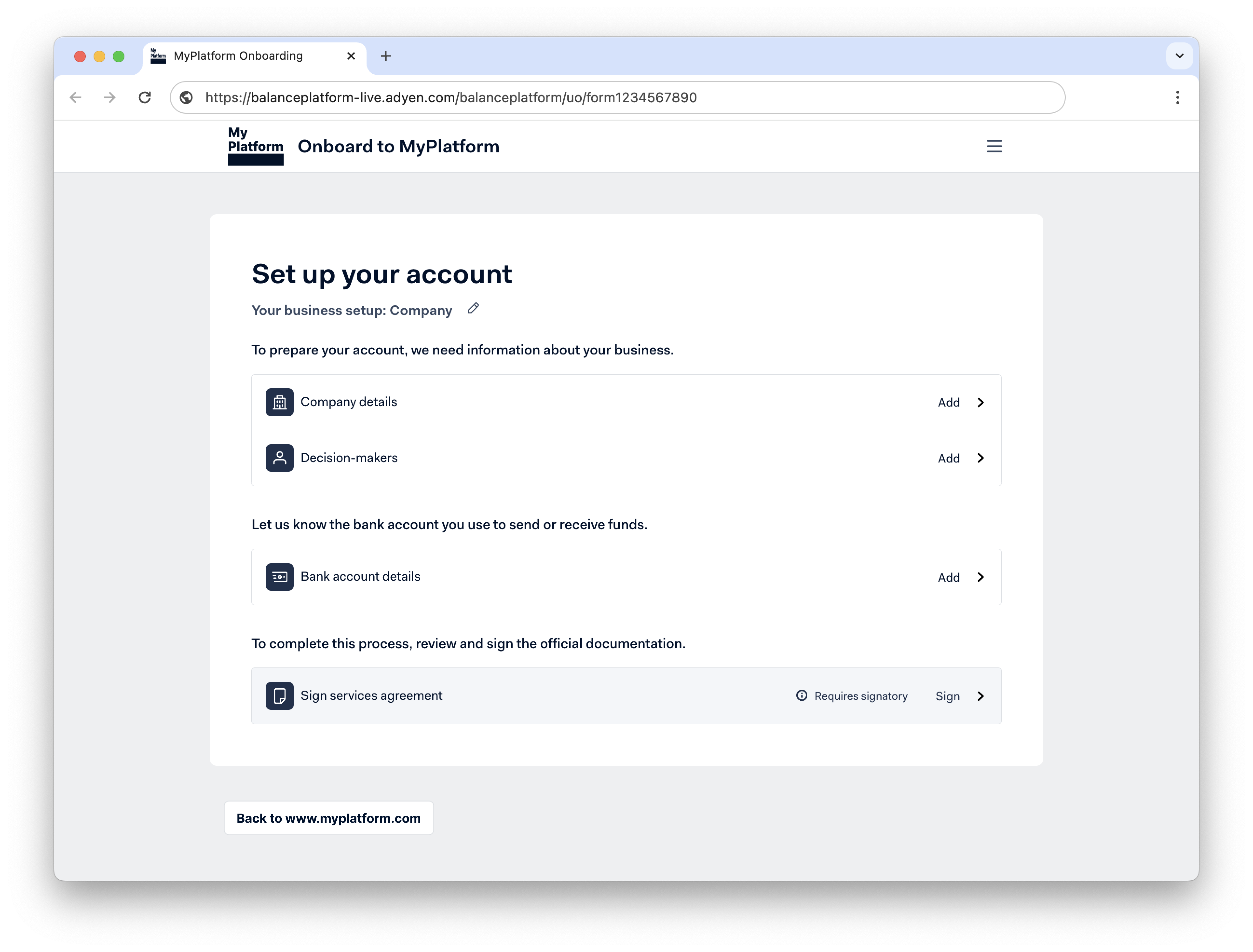
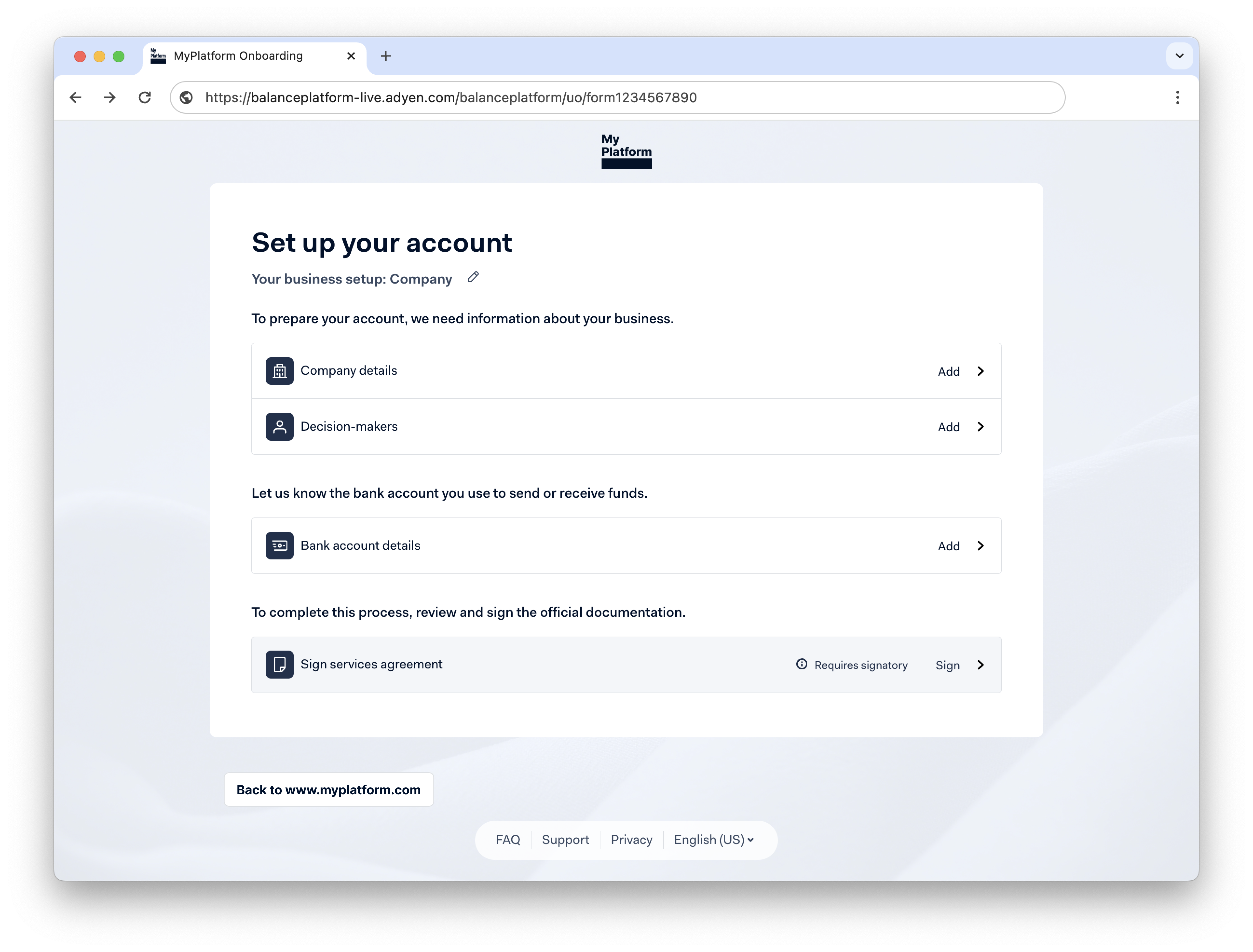
You can customize the appearance of your hosted onboarding page by creating a theme. For the best user experience, we recommend that you include the following in your theme:- Your logo
- A clear and meaningful page header
- A descriptive tab title and a favicon to make the page tab visible in the browser
- A redirectUrl that takes the user back to your platform after completing the hosted onboarding
- Custom page header
- Custom background image
- Customer Area
- API
Add a new theme
- Log in to your Customer Area.
- Select the company account.
- Select Developers > Hosted onboarding.
- Select the Create new theme button, or Add new from the drop-down menu if you have at least one existing theme.
- Add an optional description to identify the theme. If you do not add a description, the theme ID is shown in the drop-down menu list.
- Complete the fields in each section to customize the browser tab and the appearance of your onboarding page.
- Add branding to the external links.
- Select Save to save your theme.
- Copy the unique ID of your theme. You need to pass this ID when making a POST /legalEntities/{id}/onboardingLinks request to create a hosted onboarding link.
Customize the browser tab
- Add a tab title of up to 60 characters.
- Upload a favicon of a 1:1 ratio.
Customize the appearance of your onboarding page
- Upload your brand logo. The file size limit for a logo is 5 MB in JPG format.
- Specify your page header.
-
Select a background for your page. You can choose either:
- A background color using a hex color code.
- A background image. The file size limit for an image is 5 MB in PDF or JPG format.
Add branding to the external links
We recommend you use the following:| Page name | URL |
|---|---|
| Support | A link to your platform’s preferred support channel |
| Privacy statement | Adyen privacy policy |
| F.A.Q. | Hosted onboarding FAQs |
View hosted onboarding themes
You can view your hosted onboarding themes and assets in your Customer Area or by making API requests using the Legal Entity Management API.To view the themes in your Customer Area:
- Go to Developers > Hosted onboarding.
- Select a theme from the dropdown menu.
To get themes, use the following endpoints in the Legal Entity Management API:

- GET /themes: view a list of hosted onboarding themes.
- GET /themes/id: view a specific theme.
Update a hosted onboarding theme
To update a theme in your Customer Area:- Go to Developers > Hosted onboarding.
- Select a theme from the dropdown menu.
- Make your changes and select Save.
Change the page language
By default, the hosted onboarding page is rendered in the language set in the browser settings. If the browser language is not supported, the page is rendered in en-US. You can change the language of the page by specifying the locale in your /legalEntities/{id}/onboardingLinks request.The values for locale are a combination of the two-letter ISO 639-1 language and ISO 3166-1 alpha-2 country codes. If an unsupported locale value is sent in the request, the page is rendered in the next available value for a given language. For example, if en-GB is sent, the page defaults to en-US.The following languages are currently supported.| Language | Locale |
|---|---|
| Bulgarian | bg-BG |
| Croatian | hr-HR |
| Czech | cs-CZ |
| Danish | da-DK |
| Dutch | nl-NL |
| English | en-US |
| Estonian | et-EE |
| Finnish | fi-FI |
| French | fr-FR |
| German | de-DE |
| Greek | el-GR |
| Hungarian | hu-HU |
| Italian | it-IT |
| Latvian | lv-LV |
| Lithuanian | lt-LT |
| Norwegian | no-NO |
| Polish | pl-PL |
| Portuguese | pt-PT |
| Romanian | ro-RO |
| Slovak | sk-SK |
| Slovenian | sl-SI |
| Spanish | es-ES |
| Swedish | sv-SE |
Change page settings
You can control particular actions that your user performs in the hosted onboarding page by specifying the settings in your /legalEntities/{id}/onboardingLinks request.The settings object contains key-value pairs, where the key represents a specific setting.| Setting | Type | Default value | Description | |
|---|---|---|---|---|
acceptedCountries | array of strings | The list of countries the user can choose from in hosted onboarding when editPrefilledCountry is allowed. The value must be in the two-character ISO 3166-1 alpha-2 country code format. The array is empty by default, allowing all countries and regions supported by hosted onboarding. | ||
allowBankAccountFormatSelection | boolean | false | The user can select the format for their payout account if applicable. Set this to true to allow the action. | |
allowDebugUi | boolean | true | The debug user interface (UI) is enabled and can be accessed using a keyboard shortcut. Set this to false to disable the tool. | |
allowIntraRegionCrossBorderPayout | boolean | false | The user can select a payout account in a different EU/EEA location (including Switzerland and the UK) than the location of their legal entity. Set this to true to allow the action. | |
changeLegalEntityType | boolean | true | The user can change their legal entity type. Set this to false to not allow the action. | |
editPrefilledCountry | boolean | true | The user can change the country of their legal entity’s address, for example the registered address of an organization. Set this to false to not allow the action. | |
enforceLegalAge | boolean | false | The user cannot be onboarded if they are less than 18 years of age. Set this to true to prevent underage users from being onboarded. | |
hideOnboardingIntroductionIndividual | boolean | true | The introduction screen is hidden for the user of the individual legal entity type. The introduction screen provides brief instructions for the subsequent steps in the hosted onboarding process. Set this to false to allow the action. | |
hideOnboardingIntroductionOrganization | boolean | true | The introduction screen is hidden for the user of the organization legal entity type. The introduction screen provides brief instructions for the subsequent steps in the hosted onboarding process. Set this to false to allow the action. | |
instantBankVerification | boolean | true | The user can initiate the verification process through open banking providers, like Plaid or Tink. Set this to false to not allow the action. | |
transferInstrumentLimit | integer | The maximum number of transfer instruments the user can create. |
Test instant bank verification
To test the instant bank verification flow:- In your test environment, select the test account for your specified country or region.
- Enter the corresponding user name and password from the table below.
| Country/region | Test account | User name | Password |
|---|---|---|---|
| Canada | Any institution | user_good | user_good |
| Belgium | Tink Demo Bank | u51613239 | cty440 |
| Denmark | Tink Demo Bank | u51613239 | cty440 |
| Estonia | Tink Demo Bank | u91902655 | jtx720 |
| Finland | Tink Demo Bank | u80628915 | puv375 |
| France | Tink Demo Bank | u98563939 | ene512 |
| Germany | Tink Demo Bank | u98235448 | cdz248 |
| Italy | Tink Demo Bank | u51613239 | cty440 |
| Latvia | Tink Demo Bank | u91902655 | jtx720 |
| Lithuania | Tink Demo Bank | u91902655 | jtx720 |
| Netherlands | Tink Demo Bank | u48874162 | idz429 |
| Norway | Tink Demo Bank | u26049657 | mip544 |
| Poland | Tink Demo Bank | u51613239 | cty440 |
| Portugal | Tink Demo Bank | u51613239 | cty440 |
| Spain | Tink Demo Bank | u82144157 | ymm529 |
| Sweden | Tink Demo Bank | u27678322 | vrh343 |
| United Kingdom | Tink Demo Bank | u30315772 | ndg370 |
| United States | Any institution | user_good | user_good |
Troubleshoot hosted onboarding
You may need to troubleshoot if your user encounters issues during the hosted onboarding process. Hosted onboarding provides a browser-based user interface (UI) for you to use to debug. This tool allows you and your team to:- Diagnose and resolve issues faced by your users during their onboarding.
- Collect necessary details about these issues for possible escalation to support or engineering teams.
allowDebugUi setting when creating an onboarding link.To access the debug UI:- Press
Ctrl + Shift + \on your keyboard while in the hosted onboarding page. A comprehensive report of debug information appears. - To share the report, select Copy debug info at the bottom and include it in your support request.
- Metadata: Information about the SDK version, the user’s locale, and the ID of the main legal entity.
- Experiments and Settings: A list of enabled and disabled features (also known as experiments), along with the settings that were specified when creating an onboarding link.
- Task Statuses: Information on onboarding tasks that the user needs to complete, along with their current statuses. You can also see why a task shows a specific status, such as verification errors or missing data.
- Legal Entity Data: Information about the main legal entity linked to the account holder. Here, you can review the entire JSON response for the main legal entity, including entity associations and capabilities of the corresponding account holder.