

- 75 days from the transaction date for Authorization reason codes.
- 90 days from the transaction date for Processing error reason codes.
- 120 days from the transaction date for other reason codes.
- Fraud dispute flow (for Fraud reason codes)
- Non-fraud dispute flow (all other reason codes)
Fraud dispute flow
The Accel and STAR resolution flow for disputes with Fraud reason codes is as follows:- Notification of Chargeback
- First Chargeback
- Information Supplied
- Pre-arbitration
- Chargeback Reversed
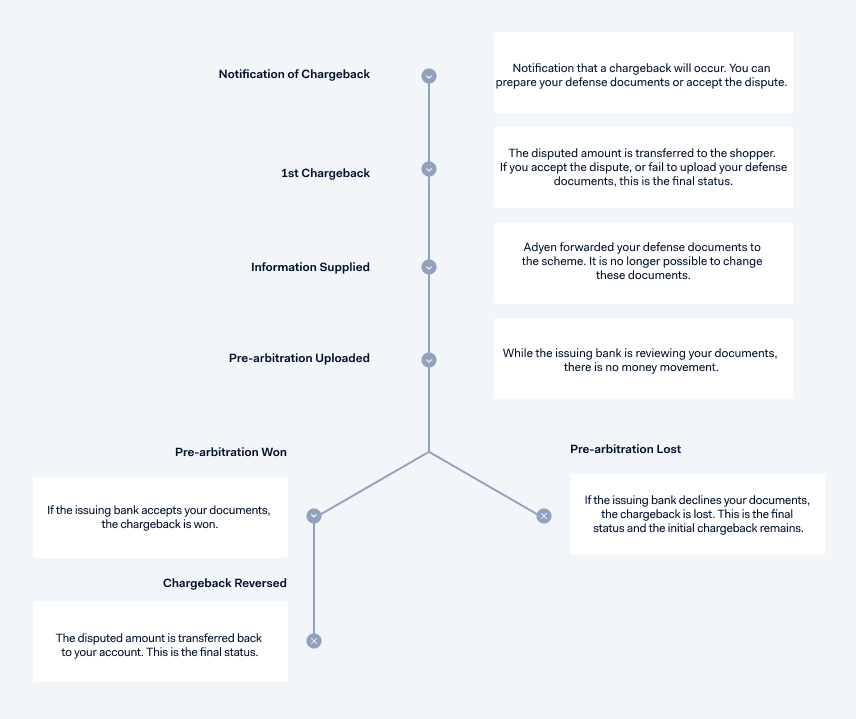
Notification of Chargeback
The issuing bank initiated a Notification of Chargeback (NoC). The NoC can occur immediately after the payment status changes to Settled or Refunded. We send you a NOTIFICATION_OF_CHARGEBACK webhook. The dispute process has started, and money will be withdrawn from your account. The chargeback debit usually occurs a few days after you receive the NoC. The 30-day period in which you can defend the dispute starts now.First Chargeback
The issuing bank initiates the first chargeback on behalf of the cardholder by sending a chargeback notification to Adyen stating the dispute reason. We assign the dispute to you for review in your Customer Area > Revenue & risk > Disputes. The NotificationOfChargeback and Chargeback journals are booked, and we send you a CHARGEBACK webhook. At the same time, your account is debited for the chargeback amount. After your review, you can decide to either:- Accept the chargeback in your Customer Area or using the Disputes API. The case will be closed for defense.
-
Defend the dispute. You need to upload the relevant defense documents in your Customer Area or using the Disputes API.
See Defense requirements for file formats and for defense documents per dispute type. Be sure to address the dispute reason and provide information that supports your position. An overview of the order details is not enough. You must provide your defense documents within 30 days after receiving the NoC. There is no opportunity later in the process to provide information or to update information you provided.
Information Supplied
Adyen received your defense documents and forwarded them to the scheme. It is no longer possible to change these documents. The InformationSupplied journal is booked and we send you an INFORMATION_SUPPLIED webhook.Pre-arbitration
Adyen automatically creates a pre-arbitration case containing your documents and forwards them to the issuing bank. The bank has 30 days to review the documents and respond by accepting or declining the case. If the bank accepts the pre-arbitration, we book the PreArbitrationWon and ChargebackReversed journals. ChargebackReversed is the final status. If the bank declines the pre-arbitration, we book a PreArbitrationLost journal. The status of the dispute remains Chargeback.Chargeback Reversed
Because the pre-arbitration was resolved in your favor, the disputed amount is transferred back to your account. The ChargebackReversed journal is booked and we send you a CHARGEBACK_REVERSED webhook. ChargebackReversed is the final status of the dispute.Non-fraud dispute flow
The Accel and STAR resolution flow for non-fraud disputes is as follows:- Notification of Chargeback
- First Chargeback
- Information Supplied
- Chargeback Reversed
- Pre-arbitration
- Second Chargeback
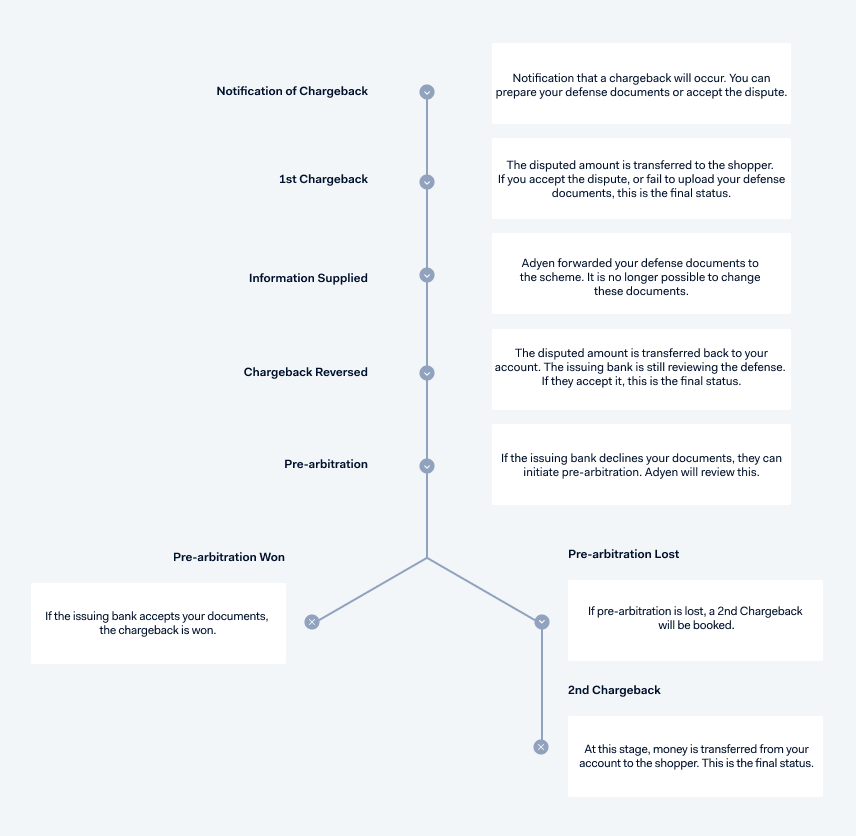
Notification of Chargeback
The issuing bank initiated a Notification of Chargeback (NoC). The NoC can occur immediately after the payment status changes to Settled or Refunded. We send you a NOTIFICATION_OF_CHARGEBACK webhook. The dispute process has started, and money will be withdrawn from your account. The chargeback debit usually occurs a few days after you receive the NoC. The 30-day period in which you can defend the dispute starts now.First Chargeback
The issuing bank initiates the first chargeback on behalf of the cardholder by sending a chargeback notification to Adyen stating the dispute reason. We assign the dispute to you for review in your Customer Area > Revenue & risk > Disputes. The NotificationOfChargeback and Chargeback journals are booked, and we send you a CHARGEBACK webhook. At the same time, your account is debited for the chargeback amount. After your review, you can decide to either:- Accept the chargeback in your Customer Area or using the Disputes API. The case will be closed for defense.
-
Defend the dispute. You need to upload the relevant defense documents in your Customer Area or using the Disputes API.
See Defense requirements for file formats and for defense documents per dispute type. Be sure to address the dispute reason and provide information that supports your position. An overview of the order details is not enough. You must provide your defense documents within 30 days after receiving the NoC. There is no opportunity later in the process to provide information or to update information you provided.